Prototype Export Schemes
Different export objects deriving from the same prototype should be formally consistent. For example, no matter how we export a quote-note, the exported thing should always include citation information. And no matter how we export a person-note, the exported thing ought to include a small portrait and a biographical date span.
There are four kinds of exported thing whose style is determined by prototype—Webpage, Subsection, SmartPanel, and SmartButton,. Taken together, these objects define a prototype’s Export Scheme.
Each content prototype has its own Export Scheme. Thus when you set a note’s prototype, you also determine how it will appear when exported. A note can have all sorts of metadata (attributes), and changing its prototype from A to B should effect a change in the export object—it should selectively reveal and conceal different things. This seems right and proper, and this is how BoxPress works.
Note that some pages receive their own special export. These special webpages are: Home, Categories, Archives, Sitemap, About, The 404 Page, and the individual Category: ___ pages.
For more information, see Explore Prototype export schemes.
Examples
Let’s see how the Export Scheme of one and the same note changes just by changing its prototype.
 |
BoxPress Speculum |
Example 1
Here is how Sample-1 exports as a SmartButton using the normal_note and article_note prototypes:
And here is how Sample-1 exports as a SmartPanel when using the two different prototypes:
Abstract: Antidepressant medications are the most popular treatment for unipolar depression in the United States, although there may be safer alternatives that are equally or more effective.
Insight-oriented psychotherapy was the least effective on most outcome measures at both evaluation periods; 30% of those patients remained in the moderate to severe range of depression, in comparison with 19% of those in the control condition. There were no significant differences between drug therapy and relaxation therapy on any outcome measure. No treatment had a significantly better outcome with the severely depressed subgroup (McLean & Taylor, 1992).
Antonuccio, David O. & Danton, William G. (1995). Therapy Versus Meds for Depression. Professional Psychology: Research and Practice, Vol. 26, No. 6, 574–585.
Abstract: Antidepressant medications are the most popular treatment for unipolar depression in the United States, although there may be safer alternatives that are equally or more effective.
Insight-oriented psychotherapy was the least effective on most outcome measures at both evaluation periods; 30% of those patients remained in the moderate to severe range of depression, in comparison with 19% of those in the control condition. There were no significant differences between drug therapy and relaxation therapy on any outcome measure. No treatment had a significantly better outcome with the severely depressed subgroup (McLean & Taylor, 1992).
Example 2:
Here is how Sample-2 exports as a SmartButton using the normal_note and quote_note prototypes:
And here is how Sample-2 exports as a SmartPanel when using the two different prototypes:
Before he realised it, he was looking at the stone again, and letting its curious influence call up a nebulous pageantry in his mind. He saw processions of robed, hooded figures whose outlines were not human, and looked on endless leagues of desert lined with carved, sky-reaching monoliths. He saw towers and walls in nighted depths under the sea, and vortices of space where wisps of black mist floated before thin shimmerings of cold purple haze. And beyond all else he glimpsed an infinite gulf of darkness, where solid and semi-solid forms were known only by their windy stirrings, and cloudy patterns of force seemed to superimpose order on chaos and hold forth a key to all the paradoxes and arcana of the worlds we know.
H. P. Lovecraft (1936). The Haunter of the Dark
Before he realised it, he was looking at the stone again, and letting its curious influence call up a nebulous pageantry in his mind. He saw processions of robed, hooded figures whose outlines were not human, and looked on endless leagues of desert lined with carved, sky-reaching monoliths. He saw towers and walls in nighted depths under the sea, and vortices of space where wisps of black mist floated before thin shimmerings of cold purple haze. And beyond all else he glimpsed an infinite gulf of darkness, where solid and semi-solid forms were known only by their windy stirrings, and cloudy patterns of force seemed to superimpose order on chaos and hold forth a key to all the paradoxes and arcana of the worlds we know.
Prototype-influenced export objects
There are four export objects that are prototype-influenced—Webpage, Subsection, SmartPanel, SmartButton. These four objects together determine a prototype’s Export Scheme. A prototype’s Export Scheme is how the prototype expresses its type through these four kinds of object.
For example, quote-note Webpages are indented and have a citation footer indicating author, title, and url. Audio-notes include a fancy audio player at top. A code-note includes a Code Undertitle showing Type, Syntax, Purpose, and Scope—and adds a pink background. A person-note begins with a small left-aligned portrait, and includes a Research Undertitle with biographical date span. The Undertitle of a book-note features author and publication year. (The Research Undertitle feature is unique to the 7 Research Prototypes, is modular, and is constructed by adding AUTHOR, TITLE, JOURNAL, and DATE keywords in the prototype’s $blogUnderOpt key attribute. For more, see here.)
The other prototype-controlled export objects—Subsection, SmartPanel, and SmartButton—also vary according to prototype. For example, when exported as a SmartButton, a person-note shows a thumbnail portrait (or a person Glyphicon) plus a biographical date span; a book-note shows a book Glyphicon plus year of publication; a code-note displays the code Type, Syntax, Purpose, and Scope.
The Undertitle feature in Research Prototypes
The six Research Prototypes have a useful Undertitle feature that appears in Webpages, Subsections, and SmartPanels.
Undertitle options: $blogUnderOpt
SmartButtons are not the only elements that include prototype-specific metadata.
Seven of the BoxPress content prototypes are Research Prototypes. The 7 Research Prototypes are article_note, person_note, book_note, quote_note, quote_ana_note, event_note, and film_note. Exporting a research note will add a useful Undertitle feature to Webpages, Subsections, and SmartPanels.
The great thing about the Undertitle element is that its construction is modular and easily modifiable using the $blogUnderOpt pop-up:
- To access
$blogUnderOptas a key attribute, run the Keys•Tech stamp. - Now add what you want to appear in the Undertitle using the pop-up list. Choose from AUTHOR, TITLE, JOURNAL, and DATE.
When you export, the Undertitle will appear at the top of the Webpage, Subsection, or Panel. Undertitles for article_note use MLA format.
The default settings can be seen here, using the View > Use Columns:
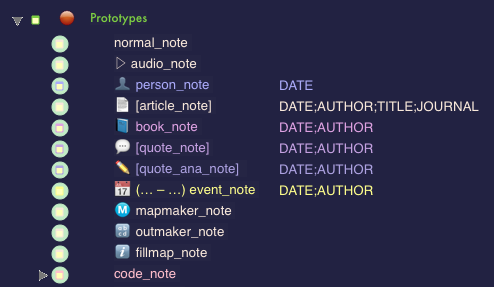
How $blogUnderOpt has been set for your Research Prototypes.
It is by means of their $blogUnderOpt values that your Research Prototypes display their key information under the post title.
You can see the Undertitle constructions for the Research Prototypes in the sampler below:
The Undertitle in code-notes
Code-notes also display an automatic Undertitle that displays the note’s syntax, type, scope, and purpose, as show here:
Sample code_note
Syntax: Arg1, Arg2, [OptionalArg3]
Type: Type
Scope: This is my scope
Purpose: This code note has been made for demo purposes
My name is Sample code_note. This is dummy text. The purpose of all this is to show how such a note gets embedded inside your layout. Below is some plausible Tinderbox code. This is dummy text.
Hover below to reveal BoxPress code
Here is some plausible Tinderbox code. ^do(_striptags, "$2")^<figure ^if($3)^class="center-block $3"^endIf^><a target="_blank" href=^if($4)^"$4"^else^"^root^img/$1"^endIf^><img src="^root^img/$1" alt="^value($tmpStr1(_stripnote))^" title="^value($tmpStr1(_stripnote))^" ^if($5)^width="$5"^endIf^ class="img-responsive center-block well well-sm ^if($3)^^value("$3".replace("(img-left|img-right)","))^^endIf^"></a><figcaption>$2</figcaption></figure>"